Getting Started with the P3B1602DP Evaluation Board
Contents of this document
-
Out of the Box
-
Get to Know the Hardware
-
Build and Load
Sign in to save your progress. Don't have an account? Create one.

Purchase your P3B1602 Evaluation Board
1. Out of the Box
The NXP analog product development boards provide an easy-to-use platform for evaluating NXP products. The boards support a range of analog, mixed-signal and power solutions. They incorporate monolithic integrated circuits and system-in-package devices that use proven high-volume technology. NXP products offer longer battery life, a smaller form-factor, reduced component counts, lower cost, and improved performance in powering state-of-the-art systems.
This page will guide you through the process of setting up and using the P3B1602DP-EVB evaluation board.
1.1 Kit Contents/Packing List
The kit contents include:
- Assembled and tested evaluation board in an antistatic bag
- Quick Start Guide
1.2 Additional Hardware
- External power supplies such as VCCA and VCCB
- External signals generator to be shifted from the host system
- Scope to observe the shifted signals
2. Get to Know the Hardware
2.1 Board Features
- 2‑bit I3C buffer with integrated auto direction sensing and bidirectional voltage level translation
- VCCA can be between 0.7 V to 1.98 V, and VCCB can be between 1.08 V to 3.63 V
- Signals to be shifted are to be connected to A-side or B-side and the shifted signals are available on B-side or A-side
2.2 Board Description
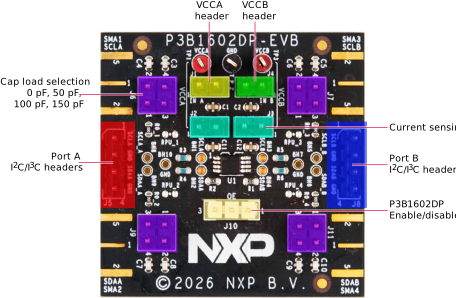
The evaluation board is designed as a stand-alone platform that allows users to evaluate the performance of the P3B1602DP (I3C buffer and bidirectional level translator).
Port A signals are routed to header J5, enabling easy connection to an I²C/I3C controller or target.
These signals are also routed to SMA connectors SMA1 and SMA2, corresponding to SCLA and SDAA, respectively.
Port B signals are routed to header J8, allowing easy connection to an I²C/I3C controller or target.
These signals are also available through SMA connectors SMA3 and SMA4, corresponding to SCLB and SDAB.
The P3B1602DP evaluation board can be enabled or disabled via header J10. To enable the device, connect
pins 2–1; to disable it, connect pins 2–3.
The P3B1602DP evaluation board is powered through connectors J1 and J4. J1
supplies VCCA, while J4 supplies VCCB. For current sensing and to allow connection or disconnection of
the supply voltage, headers J2 and J3 are provided.
The P3B1602DP evaluation board includes 30 Ω series resistors, as recommended in the data sheet. It also includes
capacitive loads that can be connected through headers J6, J7, J9, and
J11.
3. Build and Load
3.1 Configure the Hardware
To set up the hardware, perform the below steps:
- Unpack the evaluation board and review the default pin-header configuration
- Ensure
J2andJ3are close to connect supply voltage to P3B1602DP - Ensure
J10to enable communication between Port A and Port B:- Connect pins 1–2 to enable the device
- Connect the power supplies:
- Apply VCCA through connector
J1 - Apply VCCB through connector
J4
- Apply VCCA through connector
- Connect the I²C/I3C host on any side and the I2C/I3C target to the opposite side:
- Controller → A-side (
J5) ⇒ Target → B-side (J8) - Controller → B-side (
J8) ⇒ Target → A-side (J5)
- Controller → A-side (
Design Resources
Board Information
Additional Resources
In addition to P3B1602DP, I3C buffer and bidirectional voltage level translator, you may also want to visit product summary pages of these voltage level translators:
Analog Toolbox consists of HW pages that contain all NXP reference designs and evaluations board kits.