Quick Start Guide for S32K3X8EVB Board
Contents of this document
-
Out of the Box
-
Get Software
-
Plug It In
-
Build and Debug
Sign in to save your progress. Don't have an account? Create one.
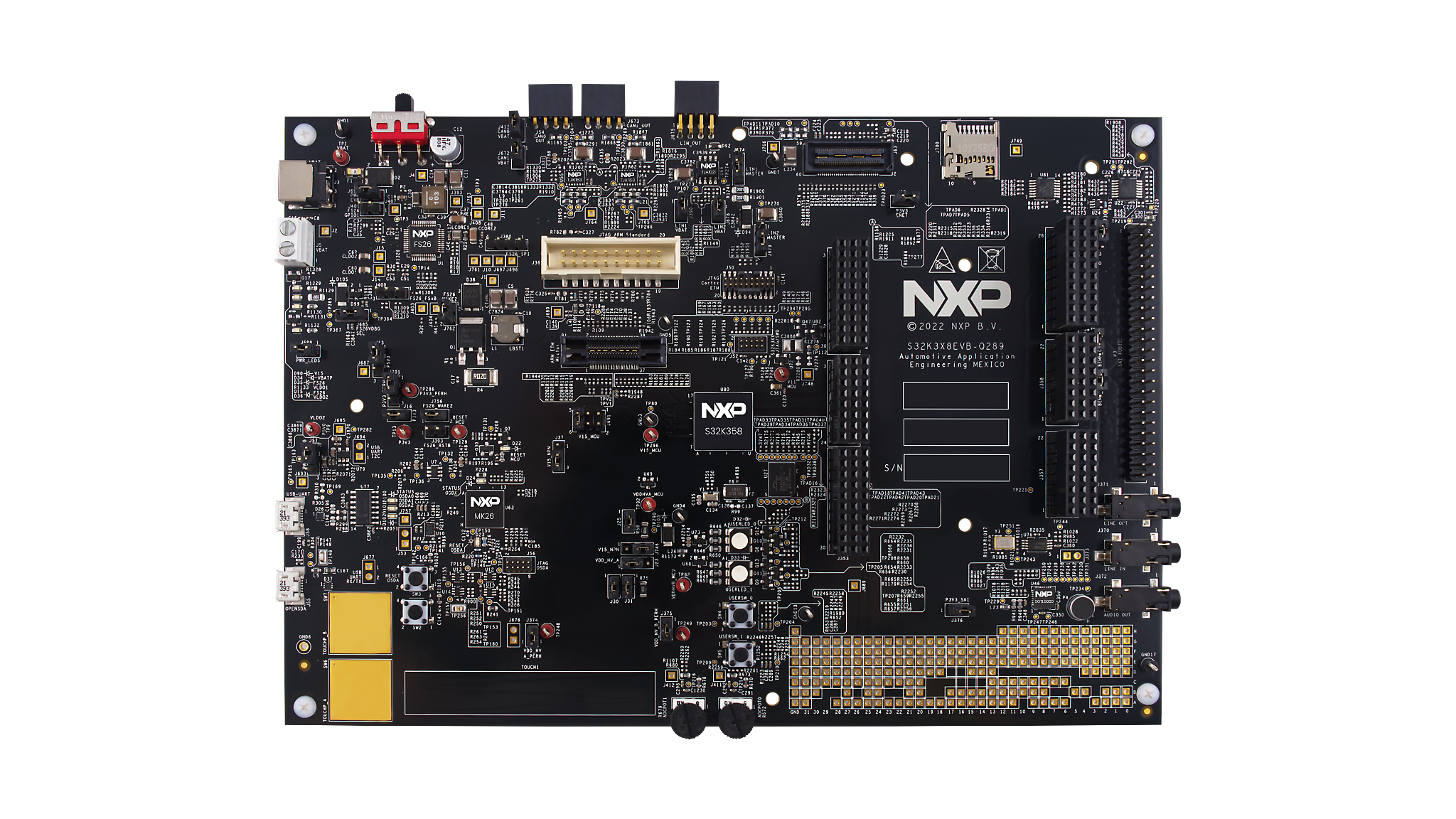
Purchase your S32K3X8EVB-Q289 Evaluation Board for Automotive General Purpose
1. Out of the Box
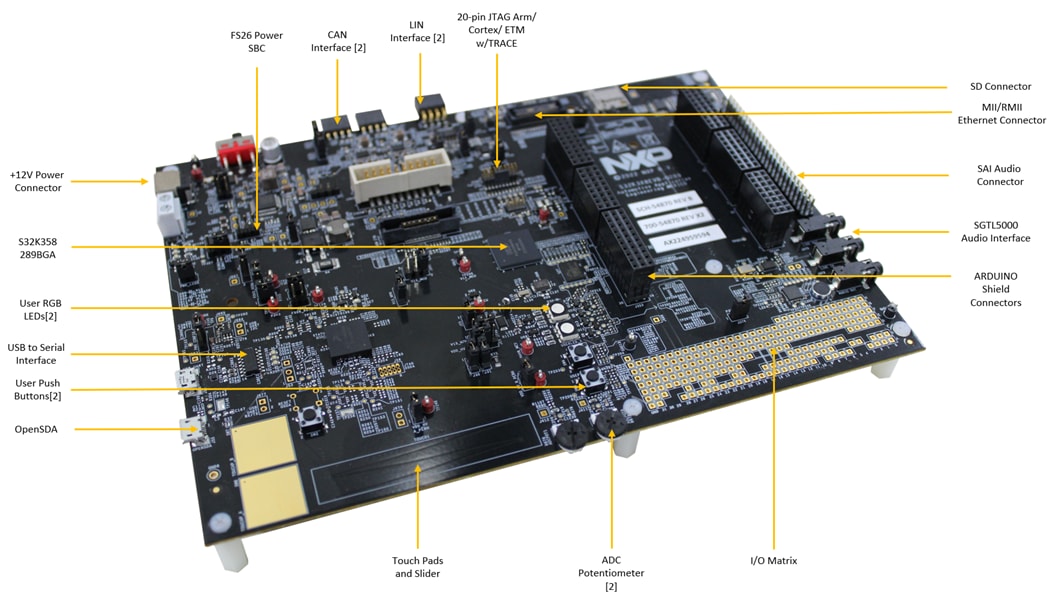
1.1 Get to Know the S32K3X8EVB-Q289 Evaluation Board
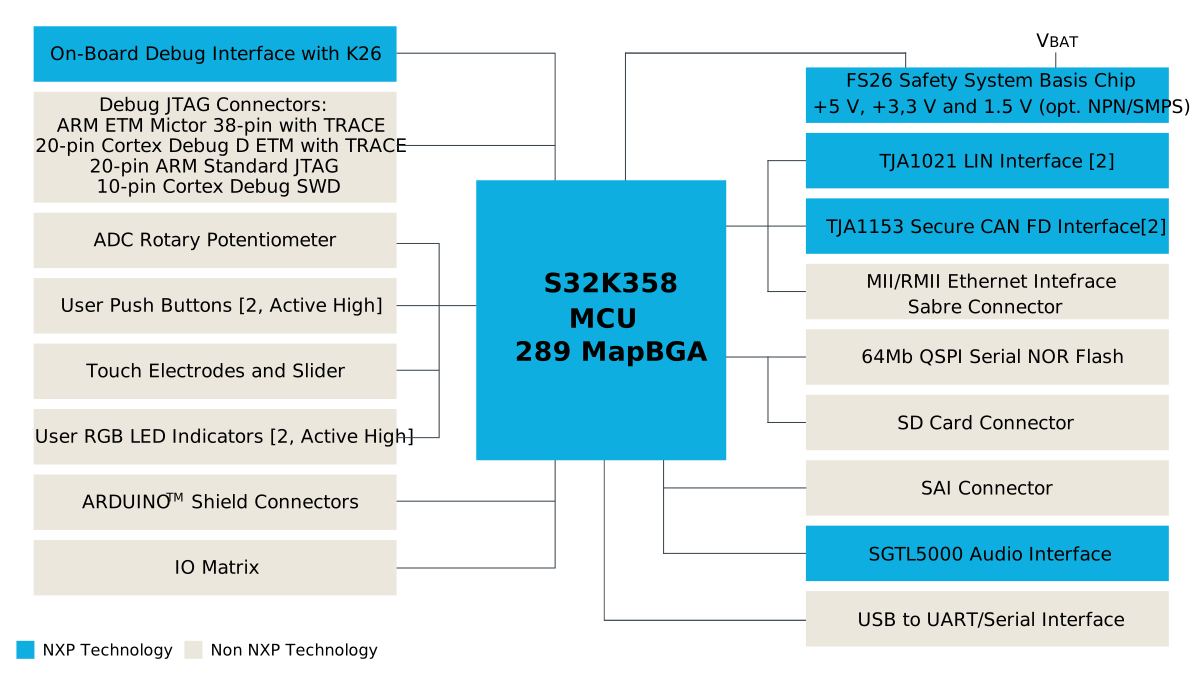
1.2 Block Diagram Features
2. Get Software
2.1 Get the Integrated Development Environment (IDE)
Download and install S32 Design Studio IDE for S32 Platform.
Download S32DS IDE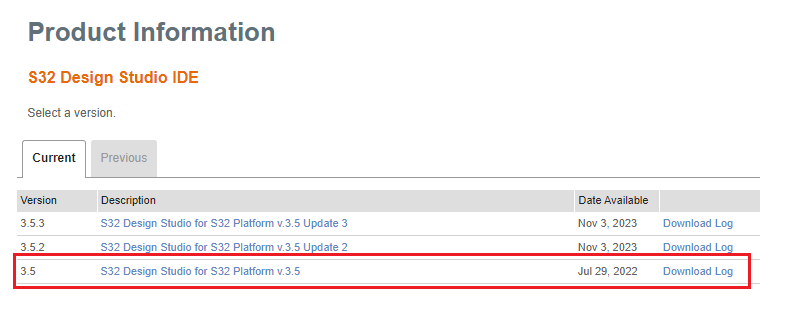
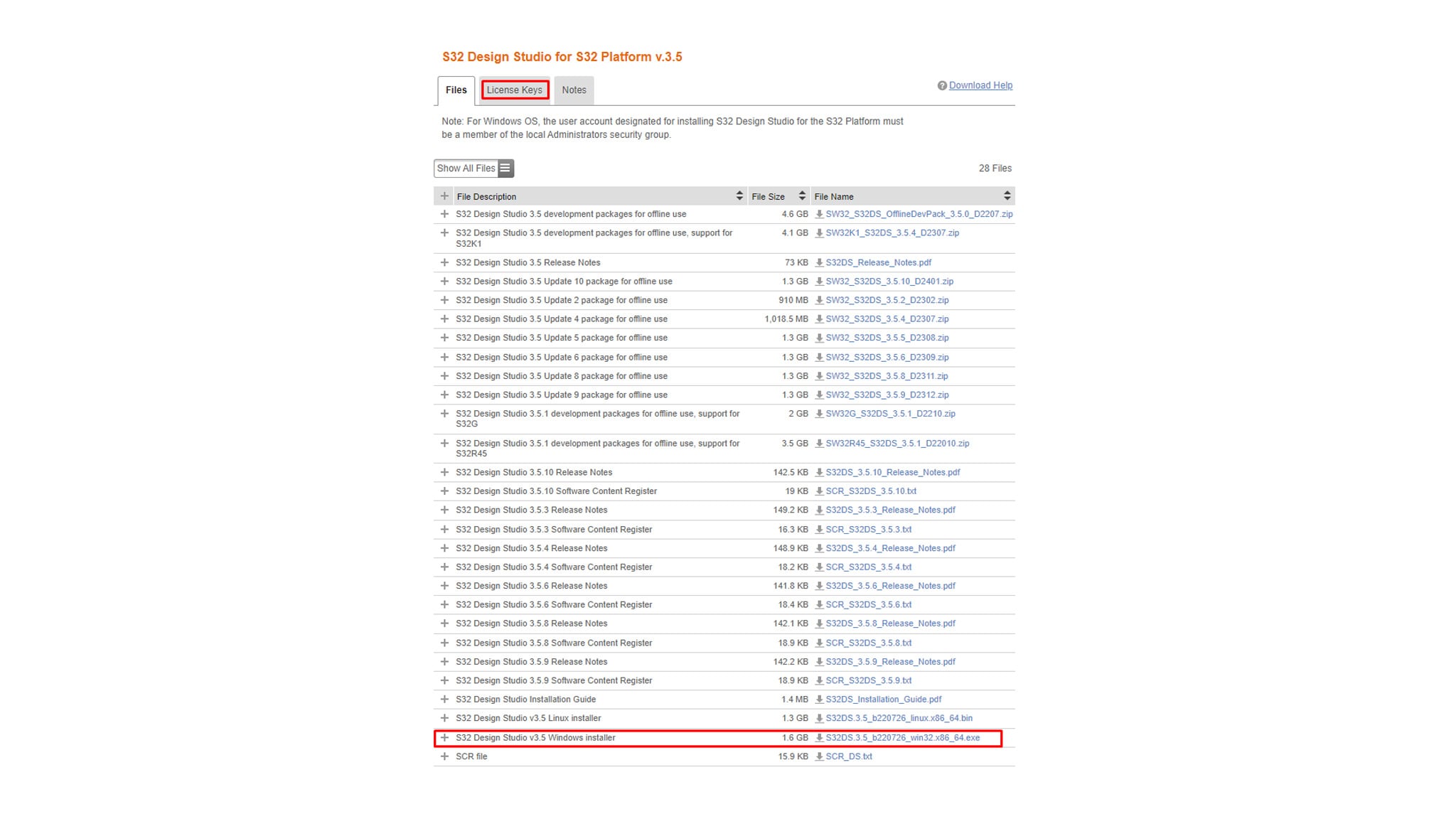
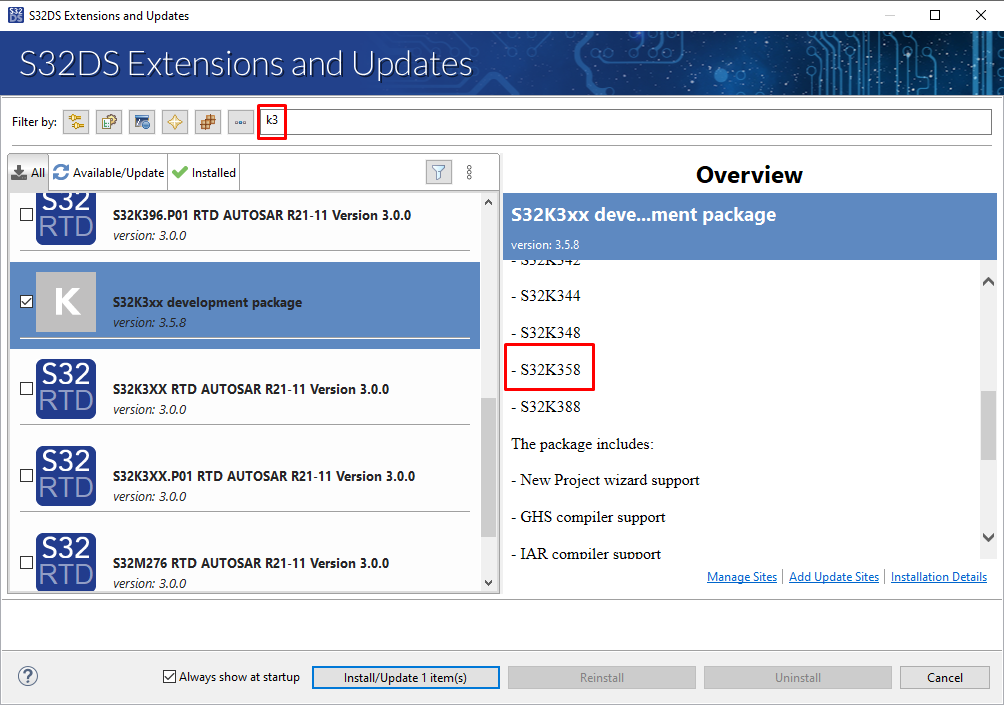
2.2 Install the S32K3xx Development Package and RTD
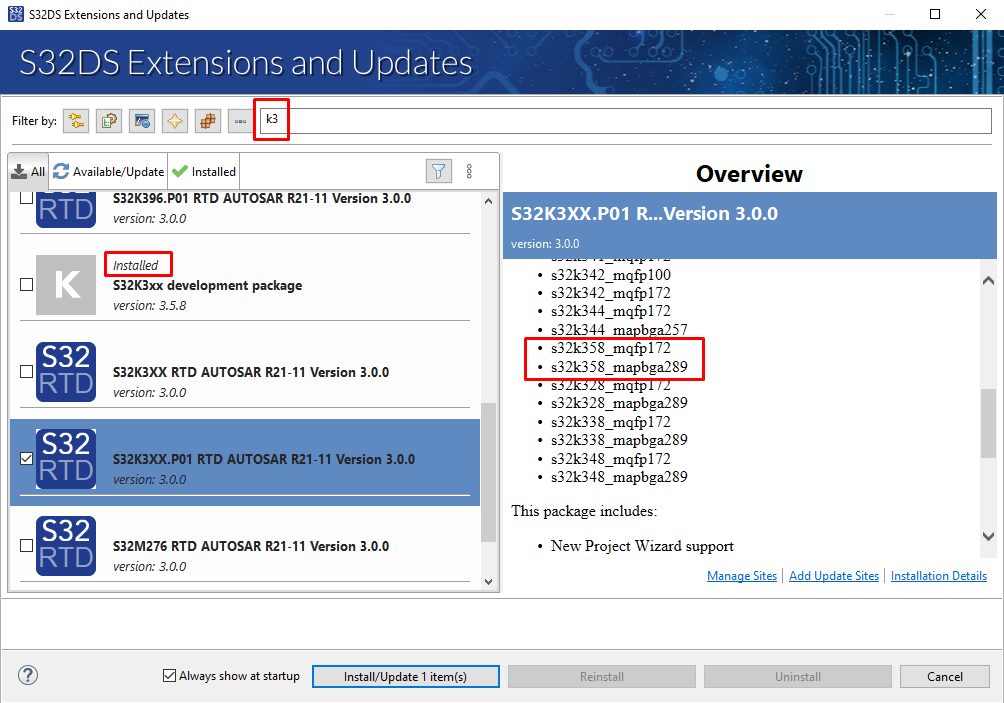
Go to Help → S32DS Extensions and Updates from the top menu to open the S32DS Extensions and Updates dialogue. Install S32K3xx Development Package.
Continue with the installation of Real-Time Drivers for S32K3xx.
2.3 For AUTOSAR® Users - Download and Install Elektrobit Tresos Studio and Real-Time Drivers
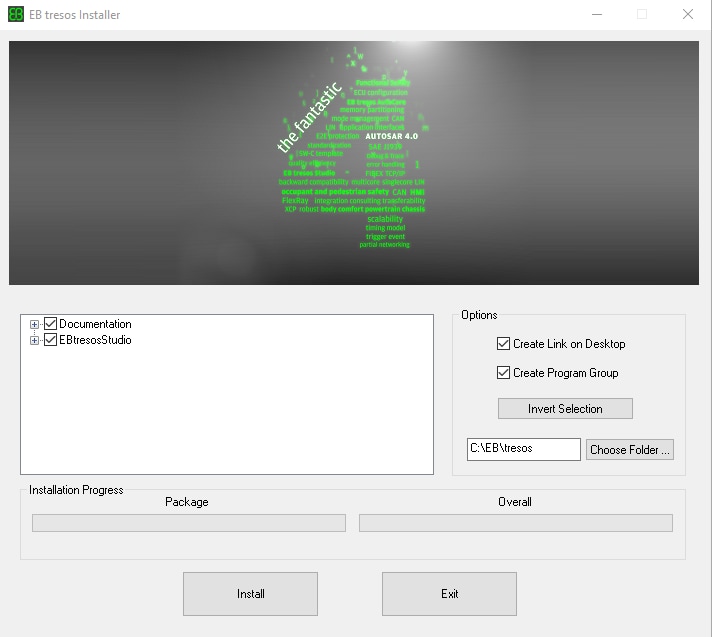
Download and install Automotive SW - Elektrobit tresos Studio / AUTOSAR Configuration Tool from the S32K3 Standard Software package.
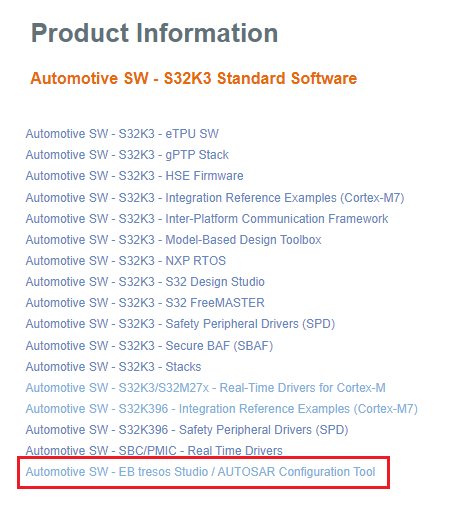
Select the version that you prefer and start the installation.
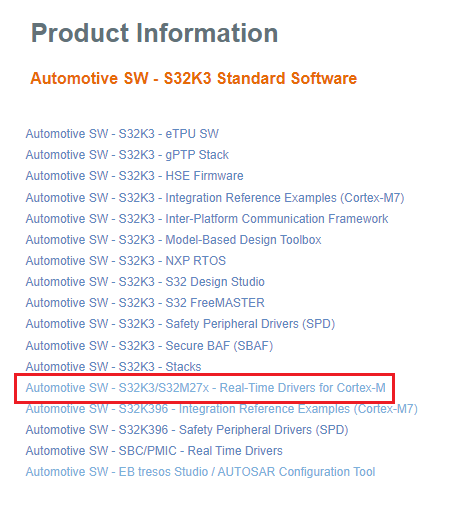
Download and install also the Automotive SW - S32K3/S32M27x - Real-Time Drivers for Cortex-M from the S32K3 Standard Software package.
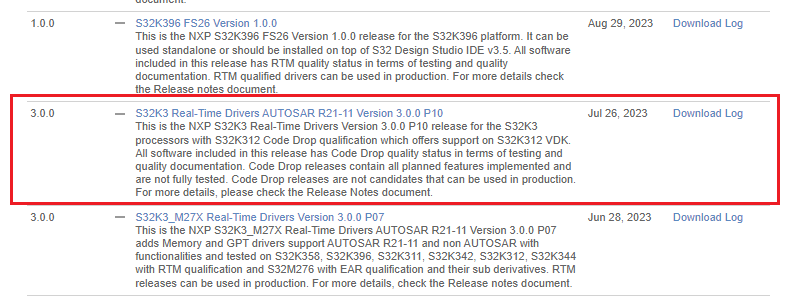
Then search for the file S32K3 Real-Time Drivers AUTOSAR R21-11 Version 3.0.0 P10.
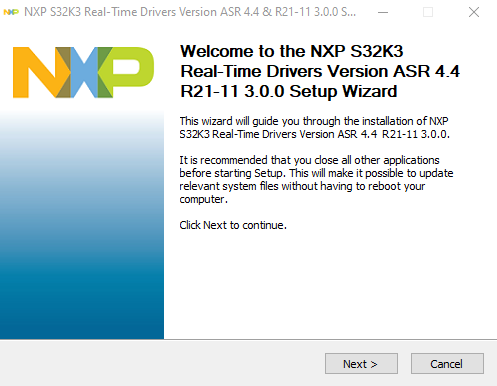
Finally, start the installation.
SW32K3_RTD_4.4_x.y.z.link file in: C:\EB\tresos\links folder with the content: "path=C:/NXP/SW32K3_RTD_4.4_x.y.z", where x,y,z refers to the installed RTD version.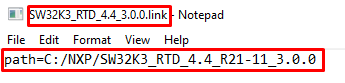
Optionally select additional software tools from the S32K3 Standard Software tools list.
2.4 Get FreeMASTER Run-Time Debug Tool
S32K3X8EVB-Q289 performs better when using the FreeMASTER Run-Time Debugging Tool.
The FreeMASTER communication driver for S32K3 microcontrollers is also needed; download updatesite file with the FreeMASTER communication driver from the Automotive SW - S32K3 - S32 FreeMASTER link in the S32K3 Standard Software package.
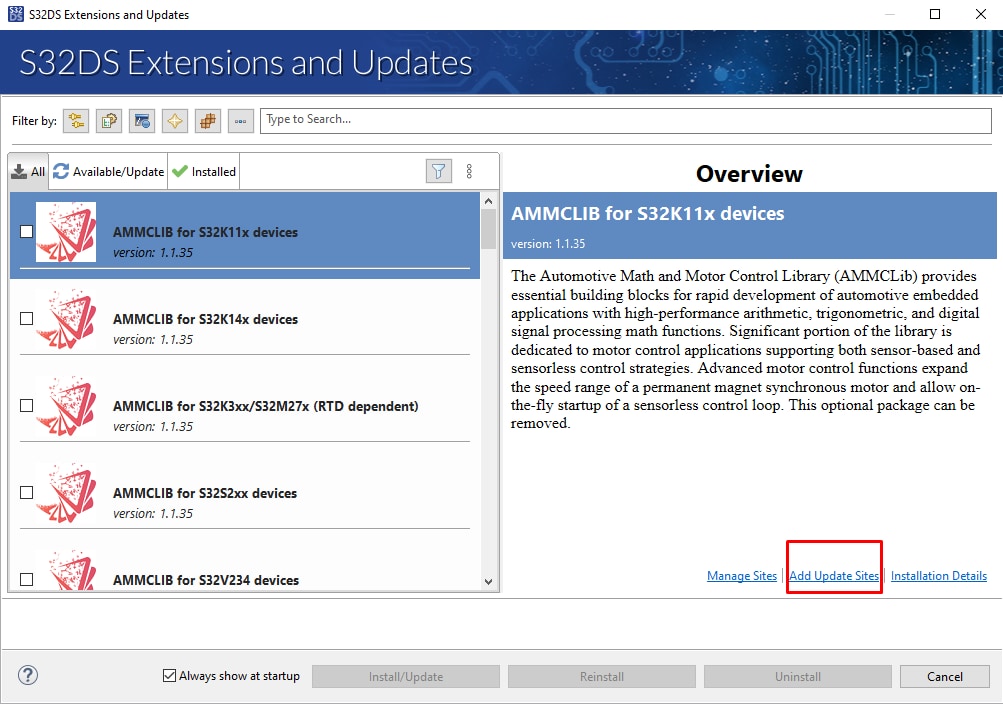
Open the S32DS Extensions and Updates dialog (menu → Help → S32DS Extensions and Updates), click Add Update Sites link and navigate to the FreeMASTER communication driver for S32K3 (zip file starting with "com.") on your disk.
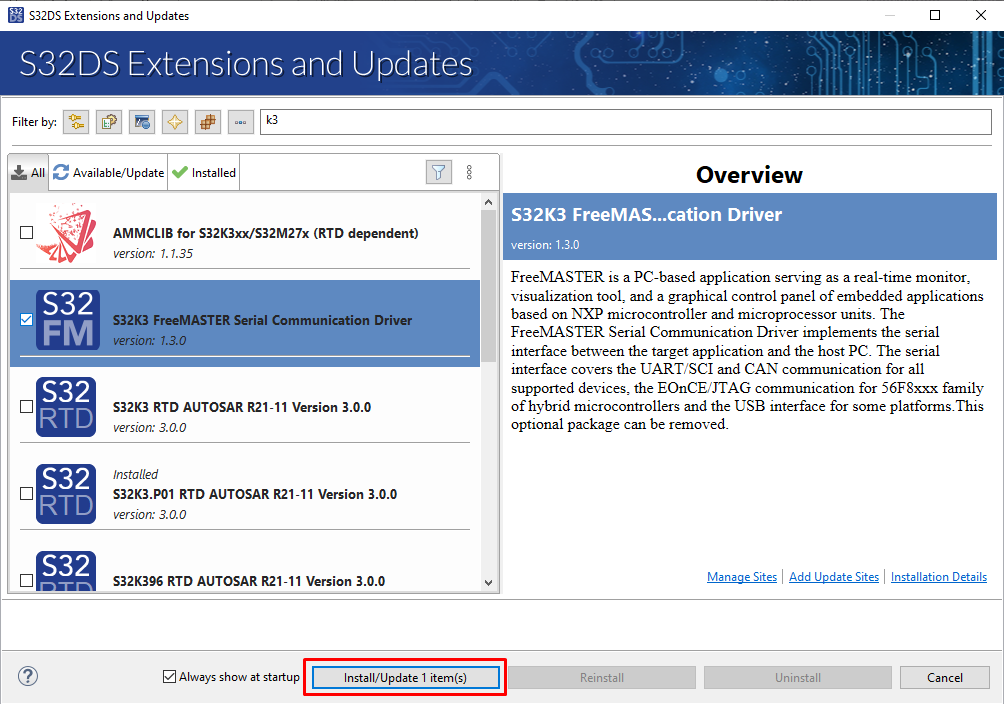
Install FreeMASTER Communication driver for S32K3.
3. Plug It In
3.1 Set Up Jumpers in the S32K3X8EVB-Q289 Evaluation Board
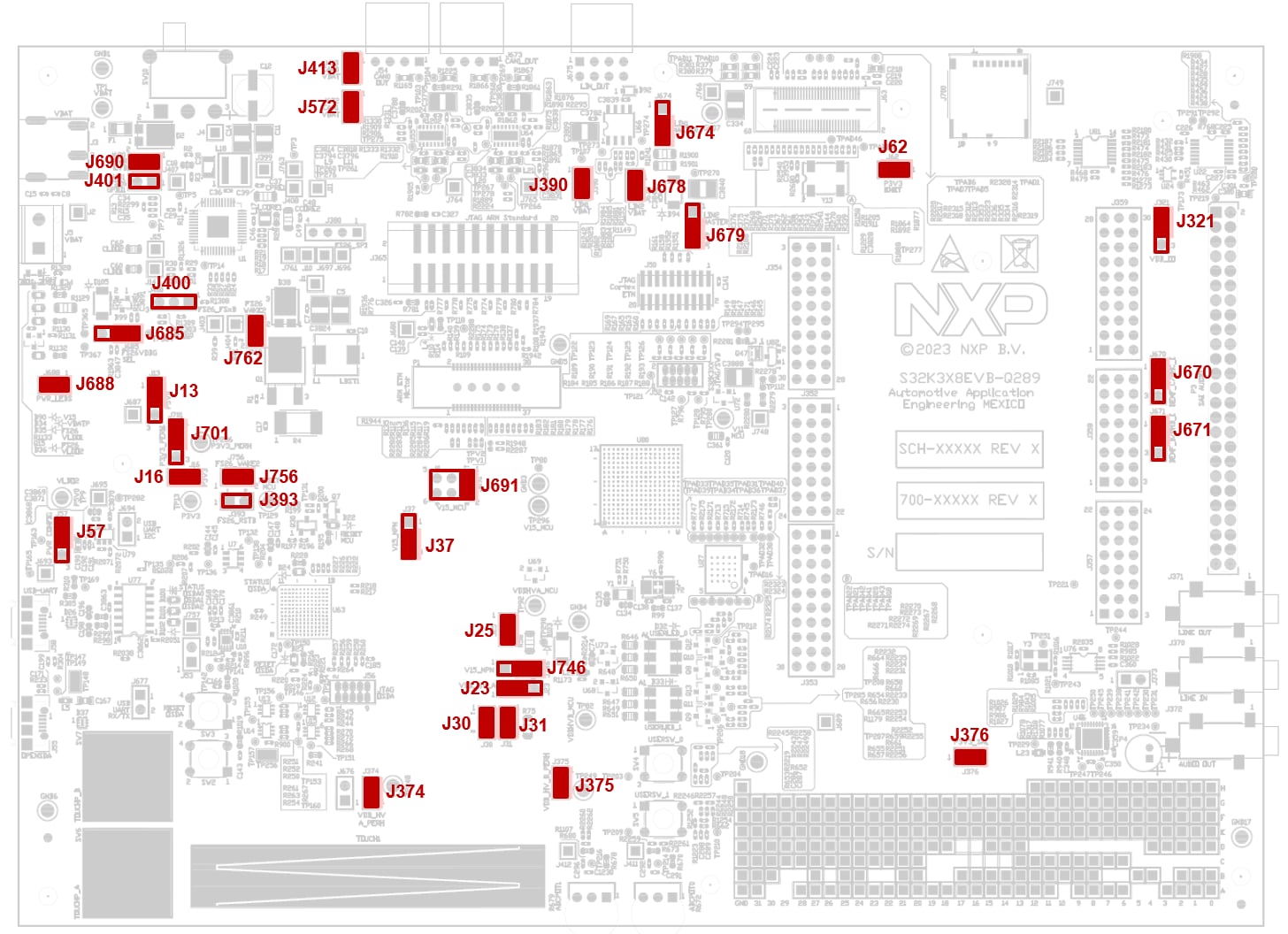
| Default Jumper settings | |||
|---|---|---|---|
| Interface | Jumper | State | Notes |
| FS26/SBC Power Supply | J13 |
1-2 | FS26_VLDO1 [+5.0 V] is routed to P5V0 domain |
J16 |
CLOSED | FS26_VLDO2 [+3.3 V] is routed to P3V3 domain | |
J393 |
OPEN | RESET_MCU signal disconnected from FS26_RSTB pin | |
J400 |
OPEN | FS26_FS0B and FS26_FS1B signals | |
J401 |
OPEN | FS26_GPIO1 and GND signals | |
J685 |
1-2 | Select the debug mode of the FS26 | |
J688 |
CLOSED | Power LED Indicators enabled | |
J690 |
CLOSED | Input from VBAT connectors | |
J701 |
1-2 | FS26_VTRK2 [+3.3 V] is routed to P3V3_PERH domain | |
J756 |
CLOSED | RESET_MCU signal routed to FS26_WAKE2_IN pin | |
J762 |
CLOSED | PGOOD signal from MCU routed to FS26_GPIO2 pin | |
| S32K358 MCU | J23 |
1-2 | P5V0 (+5.0V from the FS26) is selected for the VDD_HV_A_MCU reference |
J25 |
CLOSED | VDD_HV_A is routed to VDD_HV_A_MCU reference. Remove R58 to enable J25 functionality |
|
J30 |
CLOSED | P3V3 (+3.3V from the FS26) is selected for the VDD_HV_B_MCU reference | |
J31 |
CLOSED | VDD_HV_B is routed to VDD_HV_B_MCU reference. Remove R75 to enable J31 functionality |
|
J37 |
2-3 | VDD_HV_B_MCU is routed to the collector pin of the V15 ballast transistor | |
J374 |
CLOSED | VDD_HV_A is routed to VDD_HV_A_PERH | |
J375 |
CLOSED | VDD_HV_B is routed to VDD_HV_B_PERH | |
J691 |
1-2 | V15_NPN [+1.5V] is routed to V15_MCU domain | |
J746 |
2-3 | VDD_HV_B_MCU is routed to the source pin of the V15 DC/DC converter | |
| USB to UART/I2C Interface | J57 |
1-2 | USB is in self-powered configuration |
| Ethernet Interface | J62 |
CLOSED | P3V3 domain is routed to P3V3_ENET |
| User Peripherals | J321 |
1-2 | VDD_HV_A_PERH is routed to VDD_IO |
J670 |
1-2 | PTE0 is routed to the ARDUINO shield connector | |
J671 |
1-2 | PTE1 is routed to the ARDUINO shield connector | |
| LIN Interface | J390 |
CLOSED | LIN1 physical layer is enabled |
J674 |
2-3 | LIN1 commander mode* selected | |
J678 |
CLOSED | LIN2 physical layer is enabled | |
J679 |
2-3 | LIN2 commander mode* selected | |
| CAN Interface | J413 |
CLOSED | CAN1 physical layer is enabled |
J672 |
CLOSED | CAN2 physical layer is enabled | |
| Audio Interface | J376 |
CLOSED | Audio interface is enabled |
3.2 Plug In the Power Supply
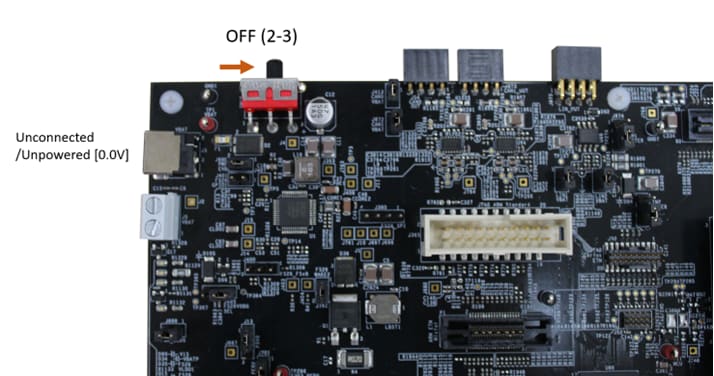
Switch SW10 to the OFF position (fully to the right).
Connect the 12 V power supply adapter and switch SW10 to the ON position (fully to the left).
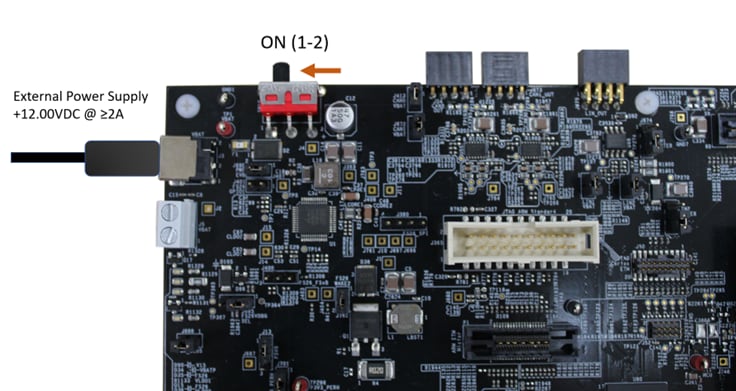
When power is applied to the EVB, four orange LED's adjacent to the voltage regulators show the presence of the supply voltages (12 V, 5 V, 3.3 V and 1.5 V).
3.3 Debugger Connection
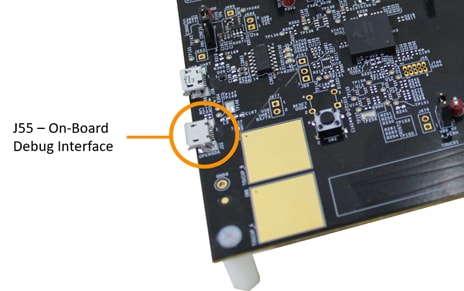
Connect a micro-USB cable to the J55 connector to debug via the on-board S32K3 debugger.
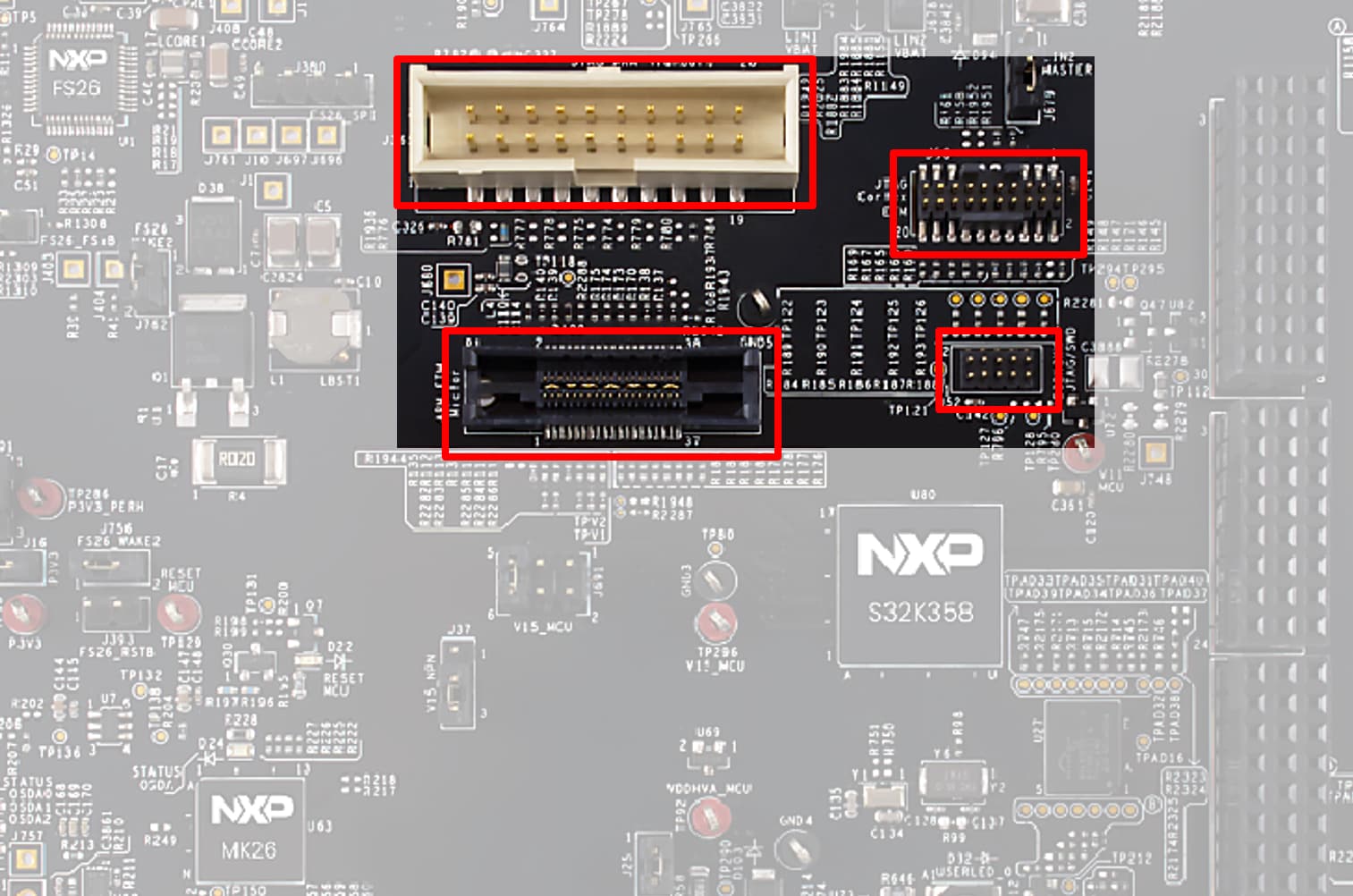
or use one of available JTAG connectors for debug via external S32K3 debugger.
4. Build and Debug
4.1 Create S32DS Project from Example
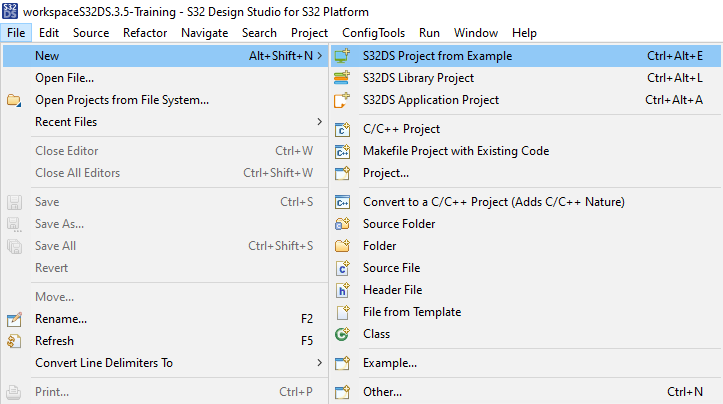
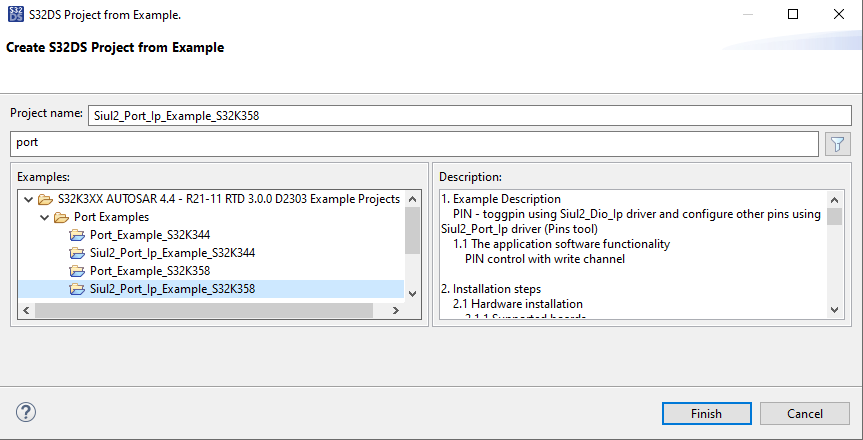
Go to menu → File → New → S32DS Project from Example. Select one of RTD example codes. For example Siul2_Port_Ip_Example_S32K358.
4.2 Generate Configuration
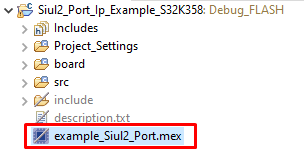
- Double-click on project mex file
- Set PTG30 pin (connected to Green LED) as GPIO Output
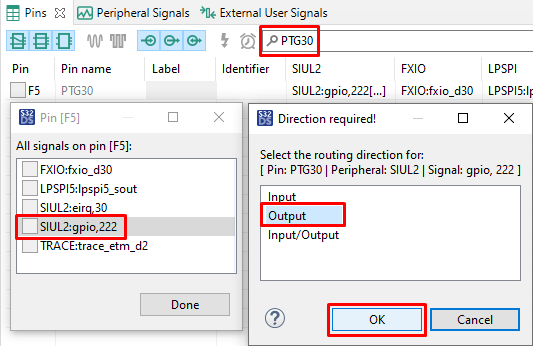
- Define PTG30 Identifier (without spaces). For example "GREEN_LED".
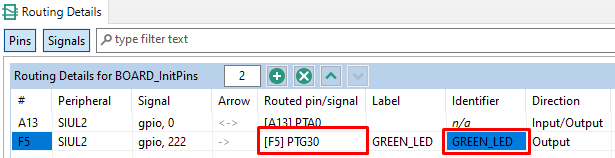
- Please unsure that you configure appropriate project and click on Update Code button for generating configuration files.

4.3 Edit Code
Return back to the C/C++ perspective.
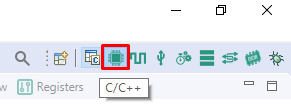
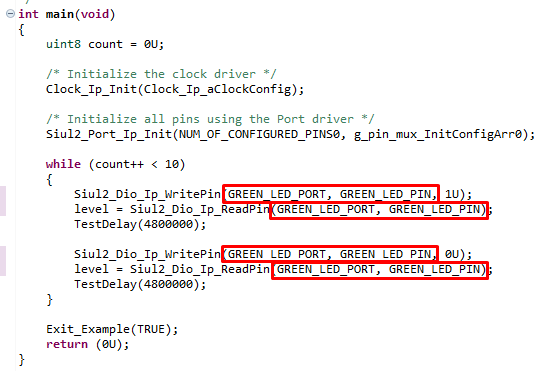
Edit main.c file in src folder and modify all instances (4x) of "LED_PORT" and "LED_PIN" to "GREEN_LED_PORT" and "GREEN_LED_PIN".
4.4 Upload software and Debug
Use Debug Configuration menu and select one of predefined debug configurations for building and uploading software into MCU.
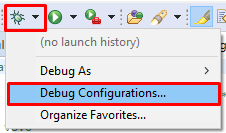
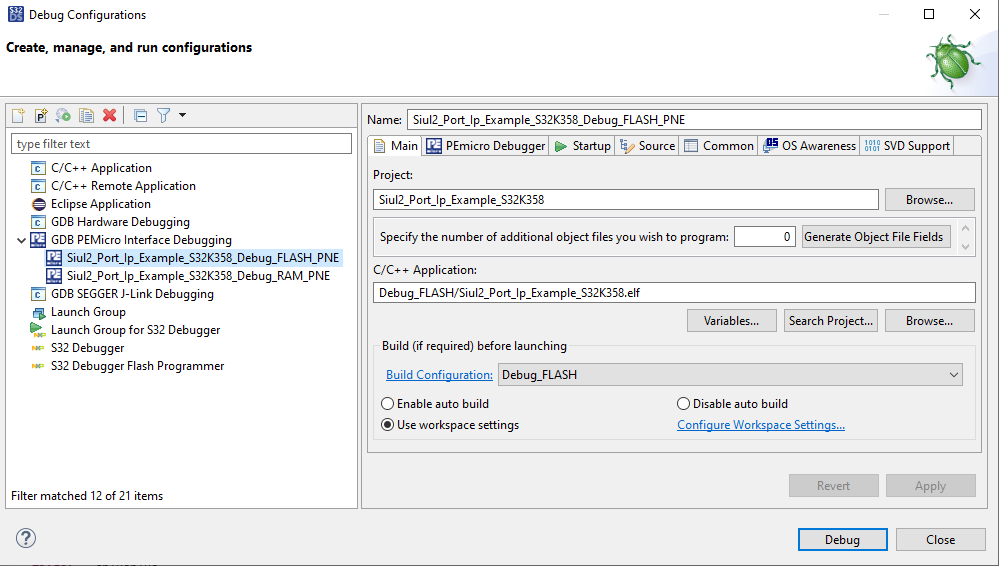
The S32DS will switch into Debug perspective where you may let code run.

The green LED will now blinking for approximately 10s.
RTD Examples
Kickstart your RTD journey with these handy examples. We've rounded up some of the most common use cases to get you inspired and moving forward.
Users can copy the path directly into their window once the RTD is downloaded.
RTD Examples
ADC
C:\NXP\S32DS.3.6.1\S32DS\software\PlatformSDK_S32K3\RTD\Adc_TS_T40D34M30I0R0\examples\S32DS\S32K358\Adc_example_S32K358ADC SAR BCTU IP
C:\NXP\S32DS.3.6.1\S32DS\software\PlatformSDK_S32K3\RTD\Adc_TS_T40D34M30I0R0\examples\S32DS\S32K358\Adc_Sar_Bctu_Ip_example_S32K358CAN
C:\NXP\S32DS.3.6.1\S32DS\software\PlatformSDK_S32K3\RTD\Can_43_FLEXCAN_TS_T40D34M30I0R0\examples\S32DS\S32K358\Can_Example_S32K358FLEXCAN IP
C:\NXP\S32DS.3.6.1\S32DS\software\PlatformSDK_S32K3\RTD\Can_43_FLEXCAN_TS_T40D34M30I0R0\examples\S32DS\S32K358\FlexCAN_Ip_Example_S32K358CRC
C:\NXP\S32DS.3.6.1\S32DS\software\PlatformSDK_S32K3\RTD\Crc_TS_T40D34M30I0R0\examples\S32DS\S32K358\Crc_Example_S32K358CRC IP
C:\NXP\S32DS.3.6.1\S32DS\software\PlatformSDK_S32K3\RTD\Crc_TS_T40D34M30I0R0\examples\S32DS\S32K358\Crc_Ip_Example_S32K358CRYPTO CMAC CTR KEY GEN
C:\NXP\S32DS.3.6.1\S32DS\software\PlatformSDK_S32K3\RTD\Crypto_TS_T40D34M30I0R0\examples\S32DS\S32K358\Crypto_CmacCtr_KeyGenBD_S32K358CRYPTO SYMMETRIC PRIMITIVES
C:\NXP\S32DS.3.6.1\S32DS\software\PlatformSDK_S32K3\RTD\Crypto_TS_T40D34M30I0R0\examples\S32DS\S32K358\Crypto_SymmetricPrimitives_S32K358HSE IP
C:\NXP\S32DS.3.6.1\S32DS\software\PlatformSDK_S32K3\RTD\Crypto_TS_T40D34M30I0R0\examples\S32DS\S32K358\Hse_Ip_AesEncAsyncIrq_S32K358DIO
C:\NXP\S32DS.3.6.1\S32DS\software\PlatformSDK_S32K3\RTD\Dio_TS_T40D34M30I0R0\examples\S32DS\S32K358\Dio_Example_S32K358SIUL2 DIO IP
C:\NXP\S32DS.3.6.1\S32DS\software\PlatformSDK_S32K3\RTD\Dio_TS_T40D34M30I0R0\examples\S32DS\S32K358\Siul2_Dio_Ip_Example_S32K358ETH
C:\NXP\S32DS.3.6.1\S32DS\software\PlatformSDK_S32K3\RTD\Eth_43_GMAC_TS_T40D34M30I0R0\examples\S32DS\S32K358\Eth_InternalLoopback_S32K358GMAC IP
C:\NXP\S32DS.3.6.1\S32DS\software\PlatformSDK_S32K3\RTD\Eth_43_GMAC_TS_T40D34M30I0R0\examples\S32DS\S32K358\Gmac_Ip_InternalLoopback_S32K358FEE
C:\NXP\S32DS.3.6.1\S32DS\software\PlatformSDK_S32K3\RTD\Fee_TS_T40D34M30I0R0\examples\S32DS\S32K358\Fee_Example_S32K358GPT
C:\NXP\S32DS.3.6.1\S32DS\software\PlatformSDK_S32K3\RTD\Gpt_TS_T40D34M30I0R0\examples\S32DS\S32K358\Gpt_Example_S32K358PIT GPT IP
C:\NXP\S32DS.3.6.1\S32DS\software\PlatformSDK_S32K3\RTD\Gpt_TS_T40D34M30I0R0\examples\S32DS\S32K358\Pit_Gpt_Ip_Example_S32K358I²C HLD FLEXIO
C:\NXP\S32DS.3.6.1\S32DS\software\PlatformSDK_S32K3\RTD\I2c_TS_T40D34M30I0R0\examples\S32DS\S32K358\I2c_HLD_FLEXIO_Transfer_S32K358I²C IP FLEXIO
C:\NXP\S32DS.3.6.1\S32DS\software\PlatformSDK_S32K3\RTD\I2c_TS_T40D34M30I0R0\examples\S32DS\S32K358\I2c_IP_FLEXIO_Transfer_S32K358EMIOS ICU IP
C:\NXP\S32DS.3.6.1\S32DS\software\PlatformSDK_S32K3\RTD\Icu_TS_T40D34M30I0R0\examples\S32DS\S32K358\Emios_Icu_Ip_BlinkLed_S32K358ICU
C:\NXP\S32DS.3.6.1\S32DS\software\PlatformSDK_S32K3\RTD\Icu_TS_T40D34M30I0R0\examples\S32DS\S32K358\Icu_BlinkLed_ASR_Emios_S32K358LIN IP
C:\NXP\S32DS.3.6.1\S32DS\software\PlatformSDK_S32K3\RTD\Lin_43_LPUART_FLEXIO_TS_T40D34M30I0R0\examples\S32DS\S32K358\Lin_Ip_FrameTransfer_S32K358LIN
C:\NXP\S32DS.3.6.1\S32DS\software\PlatformSDK_S32K3\RTD\Lin_43_LPUART_FLEXIO_TS_T40D34M30I0R0\examples\S32DS\S32K358\Lin_MasterFrameTransfer_S32K358DMA IP
C:\NXP\S32DS.3.6.1\S32DS\software\PlatformSDK_S32K3\RTD\Mcl_TS_T40D34M30I0R0\examples\S32DS\S32K358\Dma_Ip_DmaTransfer_S32K358LCU IP
C:\NXP\S32DS.3.6.1\S32DS\software\PlatformSDK_S32K3\RTD\Mcl_TS_T40D34M30I0R0\examples\S32DS\S32K358\Lcu_Ip_LcuControlMotor_S32K358MCL
C:\NXP\S32DS.3.6.1\S32DS\software\PlatformSDK_S32K3\RTD\Mcl_TS_T40D34M30I0R0\examples\S32DS\S32K358\Mcl_DmaTransfer_S32K358CLOCK IP
C:\NXP\S32DS.3.6.1\S32DS\software\PlatformSDK_S32K3\RTD\Mcu_TS_T40D34M30I0R0\examples\S32DS\S32K358\Clock_Ip_Example_S32K358MCU
C:\NXP\S32DS.3.6.1\S32DS\software\PlatformSDK_S32K3\RTD\Mcu_TS_T40D34M30I0R0\examples\S32DS\S32K358\Mcu_Example_S32K358POWER IP
C:\NXP\S32DS.3.6.1\S32DS\software\PlatformSDK_S32K3\RTD\Mcu_TS_T40D34M30I0R0\examples\S32DS\S32K358\Power_Ip_Example_S32K358MEM EEP
C:\NXP\S32DS.3.6.1\S32DS\software\PlatformSDK_S32K3\RTD\Mem_43_Eep_TS_T40D34M30I0R0\examples\S32DS\S32K358\Mem_Eep_Example_S32K358USDHC IP
C:\NXP\S32DS.3.6.1\S32DS\software\PlatformSDK_S32K3\RTD\Mem_43_Eep_TS_T40D34M30I0R0\examples\S32DS\S32K358\Usdhc_Ip_Example_S32K358MEM EEP
C:\NXP\S32DS.3.6.1\S32DS\software\PlatformSDK_S32K3\RTD\Mem_43_ExFls_TS_T40D34M30I0R0\examples\S32DS\S32K358\Mem_43_ExFls_Example_S32K358QSPI IP
C:\NXP\S32DS.3.6.1\S32DS\software\PlatformSDK_S32K3\RTD\Mem_43_ExFls_TS_T40D34M30I0R0\examples\S32DS\S32K358\Qspi_Ip_Example_S32K358C40 IP
C:\NXP\S32DS.3.6.1\S32DS\software\PlatformSDK_S32K3\RTD\Mem_43_InFls_TS_T40D34M30I0R0\examples\S32DS\S32K358\C40_Ip_Example_S32K358MEM INFLS
C:\NXP\S32DS.3.6.1\S32DS\software\PlatformSDK_S32K3\RTD\Mem_43_InFls_TS_T40D34M30I0R0\examples\S32DS\S32K358\Mem_InFls_Example_S32K358MEM ACC
C:\NXP\S32DS.3.6.1\S32DS\software\PlatformSDK_S32K3\RTD\MemAcc_TS_T40D34M30I0R0\examples\S32DS\S32K358EMIOS OCU IP
C:\NXP\S32DS.3.6.1\S32DS\software\PlatformSDK_S32K3\RTD\Ocu_TS_T40D34M30I0R0\examples\S32DS\S32K358\eMios_Ocu_Ip_Example_S32K358OCU
C:\NXP\S32DS.3.6.1\S32DS\software\PlatformSDK_S32K3\RTD\Ocu_TS_T40D34M30I0R0\examples\S32DS\S32K358\Ocu_Example_S32K358PLATFORM MPU HLD
C:\NXP\S32DS.3.6.1\S32DS\software\PlatformSDK_S32K3\RTD\Platform_TS_T40D34M30I0R0\examples\S32DS\S32K358\Platform_MPU_HLD_Example_S32K358PLATFORM MPU IP
C:\NXP\S32DS.3.6.1\S32DS\software\PlatformSDK_S32K3\RTD\Platform_TS_T40D34M30I0R0\examples\S32DS\S32K358\Platform_MPU_IP_Example_S32K358PORT
C:\NXP\S32DS.3.6.1\S32DS\software\PlatformSDK_S32K3\RTD\Port_TS_T40D34M30I0R0\examples\S32DS\S32K358\Port_Example_S32K358SIUL2 PORT IP
C:\NXP\S32DS.3.6.1\S32DS\software\PlatformSDK_S32K3\RTD\Port_TS_T40D34M30I0R0\examples\S32DS\S32K358\Siul2_Port_Ip_Example_S32K358EMIOS PWM IP
C:\NXP\S32DS.3.6.1\S32DS\software\PlatformSDK_S32K3\RTD\Pwm_TS_T40D34M30I0R0\examples\S32DS\S32K358\Emios_Pwm_Ip_Example_S32K358FLEXIO PWM IP
C:\NXP\S32DS.3.6.1\S32DS\software\PlatformSDK_S32K3\RTD\Pwm_TS_T40D34M30I0R0\examples\S32DS\S32K358\Flexio_Pwm_Ip_Example_S32K358PWM
C:\NXP\S32DS.3.6.1\S32DS\software\PlatformSDK_S32K3\RTD\Pwm_TS_T40D34M30I0R0\examples\S32DS\S32K358\Pwm_example_S32K358RM DMAMUX
C:\NXP\S32DS.3.6.1\S32DS\software\PlatformSDK_S32K3\RTD\Rm_TS_T40D34M30I0R0\examples\S32DS\S32K358\Rm_DMAMUX_Example_S32K358RM
C:\NXP\S32DS.3.6.1\S32DS\software\PlatformSDK_S32K3\RTD\Rm_TS_T40D34M30I0R0\examples\S32DS\S32K358\Rm_Example_S32K358RM MSCM
C:\NXP\S32DS.3.6.1\S32DS\software\PlatformSDK_S32K3\RTD\Rm_TS_T40D34M30I0R0\examples\S32DS\S32K358\Rm_Mscm_Example_S32K358RM VIRT WRAP
C:\NXP\S32DS.3.6.1\S32DS\software\PlatformSDK_S32K3\RTD\Rm_TS_T40D34M30I0R0\examples\S32DS\S32K358\Rm_Virt_Wrap_Example_S32K358RM XBIC
C:\NXP\S32DS.3.6.1\S32DS\software\PlatformSDK_S32K3\RTD\Rm_TS_T40D34M30I0R0\examples\S32DS\S32K358\Rm_Xbic_Example_S32K358SENT RECEIVER
C:\NXP\S32DS.3.6.1\S32DS\software\PlatformSDK_S32K3\RTD\Sent_TS_T40D34M30I0R0\examples\S32DS\S32K358\Sent_Receiver_S32K358LPSPI FLEXIO IP
C:\NXP\S32DS.3.6.1\S32DS\software\PlatformSDK_S32K3\RTD\Spi_TS_T40D34M30I0R0\examples\S32DS\S32K358\Lpspi_Flexio_Ip_Transfer_S32K358LPSPI LP
C:\NXP\S32DS.3.6.1\S32DS\software\PlatformSDK_S32K3\RTD\Spi_TS_T40D34M30I0R0\examples\S32DS\S32K358\Lpspi_Ip_HalfDuplexTransfer_S32K358SPI HALF DUPLEX
C:\NXP\S32DS.3.6.1\S32DS\software\PlatformSDK_S32K3\RTD\Spi_TS_T40D34M30I0R0\examples\S32DS\S32K358\Spi_HalfDuplexTransfer_S32K358SPI
C:\NXP\S32DS.3.6.1\S32DS\software\PlatformSDK_S32K3\RTD\Spi_TS_T40D34M30I0R0\examples\S32DS\S32K358\Spi_Transfer_S32K358LPUART FLEXIO UART IP
C:\NXP\S32DS.3.6.1\S32DS\software\PlatformSDK_S32K3\RTD\Uart_TS_T40D34M30I0R0\examples\S32DS\S32K358\LpuartFlexio_Uart_Ip_Example_S32K358UART
C:\NXP\S32DS.3.6.1\S32DS\software\PlatformSDK_S32K3\RTD\Uart_TS_T40D34M30I0R0\examples\S32DS\S32K358\Uart_Example_S32K358SWT IP
C:\NXP\S32DS.3.6.1\S32DS\software\PlatformSDK_S32K3\RTD\Wdg_TS_T40D34M30I0R0\examples\S32DS\S32K358\Swt_Ip_Example_S32K358WDOG
C:\NXP\S32DS.3.6.1\S32DS\software\PlatformSDK_S32K3\RTD\Wdg_TS_T40D34M30I0R0\examples\S32DS\S32K358\Wdg_Example_S32K358Design Resources
Board Information
Chip Documents
Software
- Automotive Software Package Manager
-
S32K3 Standard
Software Package
-
S32K3
Reference Software Package
- S32 Design Studio IDE
- Real-Time Drivers (RTD)
- S32K Power Estimation Tool (PET)
- Model-Based Design Toolbox (MBDT)
- Structural Core Self-Test (SCST) Library
- FreeMASTER Run-Time Debugging Tool
- Inter-Platform Communication Framework (IPCF)
- Automotive Math and Motor Control Library (AMMCLib)
- S32 Safety Software Framework (SAF) and Safety Peripheral Drivers (SPD)
Support
Training
- Getting Started with S32K3 using S32DS at the hello world project Training Presentation
- S32K3xx Pins and Clocks with RTD - Training
- S32K3xx Boot and Reset Sequence - Training
- S32K3xx Basic Bring-Up for AUTOSAR MCAL and Real-Time Drivers (RTD) Based on EB Tresos - Training
- S32K3xx Communication Modules FlexCAN - Training
- S32K3xx Communication Modules FlexIO - Training
- S32K3xx Security Overview and Bring Up - Training
- S32K3xx Safety Overview - Training
- How To Use the Automotive Software Package Manager
Forums
Connect with other engineers and get expert advice on designing with the S32K3X8EVB-Q289 evaluation board using our community sites.
On this page
- 2.1
Get the Integrated Development Environment (IDE)
- 2.2
Install the S32K3xx Development Package and RTD
- 2.3
For AUTOSAR® Users - Download and Install Elektrobit Tresos Studio and Real-Time Drivers
- 2.4
Get FreeMASTER Run-Time Debug Tool
- 3.1
Set Up Jumpers in the S32K3X8EVB-Q289 Evaluation Board
- 3.2
Plug In the Power Supply
- 3.3
Debugger Connection